Vue入门(二)----仿百度搜索
简述
学习vue的第二节,由于2.0版本并不向下兼容,视频中的不少内不能实现。下面列出一些主要知识点
1
2
3
4
5
6
7
8
9
10
11
12
13
// v-on 可简写为@
// 事件冒泡是指当点击div内部的button触发show1()时,必然会冒泡到div上执行show2(),这才层级div中很常见
// 阻止冒泡,原生js法,设置事件对象的cancelBubble属性为true
// vue方法@click.stop

// 阻止默认行为,原生js法,设置事件对象的preventDefault属性为true
// vue方法@contextmenu.prevent

// 键盘事件获取键码,原生js法,使用事件对象的keyCode属性
// vue方法@keyup.键码或键名,如获取按下回车@keydown.13 或 @keydown.enter

// 绑定属性v-bind:src,简写 :src 只绑定一次使用v-once,将绑定内容转义成html使用v-html
基本知识:
vue
1
2
3
4
$http.jsonp().then()
:class
@keyup
@keydown
配置库文件
1
2
3
<script src="lib\vue.js"></script>
<!-- vue本身不支持数据交互,必须引入vue-resource.js,现在vue官方也推荐axios.js-->
<script src="lib\vue-resource.js"></script>
Script
1
2
3
4
5
6
7
8
9
10
11
12
13
14
15
16
17
18
19
20
21
22
23
24
25
26
27
28
29
30
31
32
33
34
35
36
37
38
39
40
41
42
43
44
45
46
47
<script>
window.onload = function() {
new Vue({
el: '#box',
data: {
myData: [],
content: '',
now: -1,
},
methods: {
get: function(ev) {
// 这里的键码只能通过事件对象$event传进来,因为输入大多数键都应该可以进行搜素,我们要排除的就是up(38)和down(40)
if (ev.keyCode == 38 || ev.keyCode == 40) {
return;
}
// 这里当按下的键是Enter时,应实现搜索跳转功能
if(ev.keyCode == 13) {
window.open('https://www.baidu.com/s?wd=' + this.content);
this.content = '';
}
this.$http.jsonp('https://sp0.baidu.com/5a1Fazu8AA54nxGko9WTAnF6hhy/su?wd=' + this.content, {
jsonp: 'cb'
}).then(function(res) {
this.myData = res.data.s;
}, function() {
alert("搜索失败");
})
},
changeDown: function() {
this.now++;
if(this.now == this.myData.length) {
this.now = -1;
}
// 这里实现输入框中也显示同样的内容
this.content = this.myData[this.now];
},
changeUp: function() {
this.now--;
if (this.now == -2) {
this.now = this.myData.length;
}
this.content = this.myData[this.now];
}
},
})
}
</script>
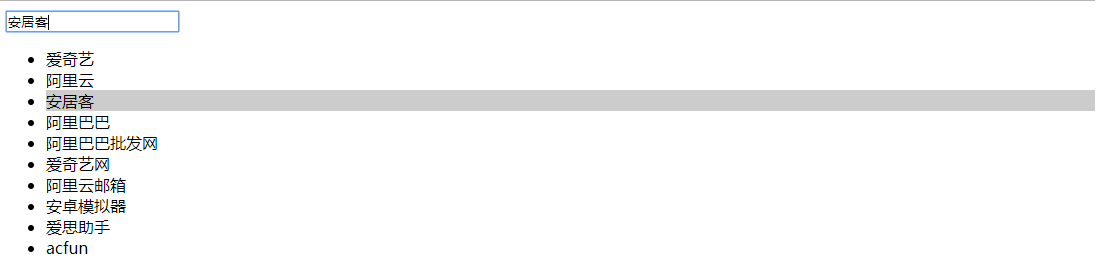
三个方法:get()用于对百度进行数据交互;cheangeDown()用于实现选中区域下移;changeUp()用于实现选中区域上移 html
1
2
3
4
5
6
7
8
9
10
11
12
<body>
<div id="box">
<input type="text" name="" id="" v-model="content" @keyup="get($event)" @keydown.down="changeDown()" @keydown.up="changeUp()">
<ul>
<!-- 这里注意给class添加属性的时候采用的是{属性:true/false}的形式 -->
<li v-for="(item, index) in myData" :class="{grey: index==now}">
{{item}}
</li>
</ul>
<p v-show="myData.length == 0">暂无数据...</p>
</div>
</body>
效果